How to Read free eBooks on Amazon Kindle

Read Free eBooks on Kindle

First Published Date: January 26, 2012

I have not tried any eBooks until recently when I purchased my Asus Eee Pad Transformer Tablet. However, once I found out the convenience of buying eBooks on Amazon Kindle Online eBook store with their one click buy option, I got hooked on it and I already have loaded my tablet with hundreds of eBooks – some of them are paid and some of them are free. Today, I will discuss how you can buy eBooks for free on the Kindle store.

You don’t need an eBook Reader or a Tablet to read eBooks. You can install Kindle for PC on your desktop or laptop to read eBooks. If you have a Tablet, you need to install the Kindle application from the app market. I will go through the two easiest ways to find eBooks on the Kindle store. There may be others ways pull free eBooks, but I like these two methods as they are very simple and fast.

Procedure One: See All Free eBooks without Categories

1. Go to the Kindle Store
2. Put “free kindle books” in the search box
3. Hit the “Go” button
4. You will see all the ebooks. As of this writing, I got 29,431 free eBooks.

Procedure Two: Sort All Free eBooks by Categories

1. Go to the Kindle Store
2. Look for the categories on the left
3. Pick the category you want
4. Sort it by price, from low to high on the top right
5. Free eBooks for that category will appear on the first few pages

Once you have found your book, click on that book and then you can buy the book by clicking the “buy” button on the top right. Yes, you still have to click the “buy” button, although it is free and you won’t be charged.

These days, I am reading more books than ever as I have access to all my eBooks on my smartphone, tablet, and PCs. If I read one book on my tablet and then open the same book on my smartphone, I will be on the same page where I left of on my Tablet (or any other devices), as all devices are synced when you read, regardless of their operating systems.

5 Safe Online Shopping Tips You Need to Know

Online Shopping Safety and Security Tips

First Published Date: February 16, 2012 ADawnJournal.com

Convenience has its advantages and disadvantages. Advantages? There’s no need to elaborate when it comes to online shopping. Disadvantages? One of the many is that con artists or scammers get hold of your credit card or other valuable information and make you suffer endlessly. I will go over some simple things you can do to make your online shopping a safe one.

1. Protect Your Computer – Use a full version Internet security software like MacAfee or ZoneAlarm. Prices have come down a lot for the paid version of such software these days and you can get a full version protection for less than $100 annually. This is the first thing to do to protect yourself.

2. Secure Your Browser – Keep your browser up to date. I recommend Google Chrome for all your online activities. Whenever you are shopping or banking online, make sure your browser is properly encrypted by checking its URL. URL should start with HTTPS:// instead of HTTP://.

3. Use Well-Reputable Websites – Internet shopping is a lot easier when you know the merchants. We all know Amazon, eBay, Future Shop and won’t be hesitant to buy something online due to their reputation. Be extra careful when you buy from a merchant you don’t know. Research online first to check if this is a fake online store that has had issues in the past dealing with customers.

4. Do Not Use Debit Cards – If you use debit cards (Interac in Canada) online, your bank account may be exposed to thieves. Canadian credit cards now offer zero liability policies for fraudulent or unauthorized transactions under some conditions. Also, you can use PayPal instead of credit cards and I find it even safer than credit cards.

5. Other Precautions – Do not use public computers or public Wi-Fi to shop online, access your bank accounts, or access your email. Use a strong password and change it from time to time.

Did You Get Your Free Canadian Phone Number For Android, Apple Smartphone or Tablet?

Dell Launches Dell Voice – A Free Phone For Canadians

First Published Date: March 8, 2012 ADawnJournal.com

(Dell Voice is now Fongo at Fongo)

Dell recently rolled out their free VOIP phone service Dell Voice for Android, Apple, and Windows devices exclusively for Canadians. A Blackberry version will soon be launched as well. Dell Voice is powered by Fongo, a VOIP tech company located in Waterloo, Ontario, Canada.

How Does Dell Voice Work?

Dell Voice is an app that you need to install on your smartphone or tablet. You will be asked to choose your free Canadian phone number from the available cities across Canada during registration. I was not able to get a Toronto area code number 416 or 649. However, I was able to get area code 289 number – which is a local number for Toronto as well. If you would like to port your existing number, a $25 charge applies.

Is Dell Voice Is Really Free?

Dell Voice uses Internet to place and receive calls. You can receive unlimited calls on your device and place calls to most of the Canadian cities for free regardless of your location, as long as you have Internet connection (3G, 4G, WiFi). Dell Voice also comes with voicemail, caller ID, call waiting, call forwarding up to 3 separate numbers, 911 emergency service, and much more – all for free.

A Few Things You Need to Be Aware Of

Dell Voice uses your Internet or phone’s data connection to make calls. It uses 1 MB per minute of your data when you are on a call. If you do not have an unlimited data plan on your phone, keep an eye on your data uses as you may exceed your allocated data plan. You can easily keep an eye on your data uses by installing a data monitor application on your phone. If you are using Dell Voice to make and receive calls using your home’s Internet connection via WiFi, keep an eye on your broadband uses if your plan is not unlimited.

Also, to keep your free Canadian phone number forever, don’t forget to use Dell Voice at least once every 90 days. You can easily avoid the deletion of your free number by buying a VoIP unlock key, if you are planning to use it every 90 days.

The World Is Your Local Area Code

The possibilities are endless with Dell Voice. The whole world is your local call as long as you have a smartphone or tablet and an Internet connection. This is a must-have app for global travellers as it breaks the barriers and boundaries of placing and receiving local calls anywhere on earth. For example, on my upcoming trip to the Philippines, I will have my Asus Transformer Tablet with me. With the Dell

Voice app, I will be able to make local calls to Canada from the Philippines and my friends and family will be able to call me local from Canada as well, although I am 7000 miles away.

Last Word

Currently, Skype does not offer a paid or a free Canadian phone number to receive calls and it charges $2.99 per month to make calls within the USA and Canada. Google Voice keeps promising a big time roll out in Canada, but it does not look like it will happen anytime soon in the near future. Dell Canada’s launching Dell Voice is the right move in the right direction to secure its place in the competitive VoIP sector, as VoIP is the future of telecommunications.

Beware of The FBI Nigerian Letter Scam

FBI Nigerian Letter Fraud

First Published Date: September 22, 2011 ADawnJournal.com

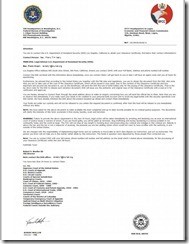
Scammers, or con artists, are in relentless pursuit of innovative products to lure their prey. A few days ago, I received a so-called “FBI Warning Letter” asking me to obtain a “Clearance Certificate” within 24 hours. Otherwise, I was told, the international court of justice will issue a warrant and charge me with terrorism, drug trafficking, or money laundering. To avoid this, I need to contact a Rev. Frank Tim Kelly at this email address: revkelly1@blumail.org. The cost to obtain the clearance certificate is $350. The letter was made to look like it was coming jointly from the FBI and EFCC (The Economic and Financial Crimes Commission).

I have attached this letter on the top left for your review. A lot of us can easily tell that this is a scam. However, I am sure a small percentage of the population will fall for this and will lose money. As we get to know the common techniques scammers use, they become more innovative and come up with new scams. You need to be vigilant and use your common sense. Also, keep yourself updated with the latest news and publications on fraud and scams. I am going to list some resources for you. Save this article and visit these resources mentioned below at your convenience.

If you ever believe you have been a victim of identity theft, here is what you can do:

– Call your local RCMP detachment or your Police Department

– Report your situation online through Reporting Economic Crime Online

– Visit PhoneBusters, send an email to info@phonebusters.com, or call 1-888-495-8501

– Visit FBI’s Be Crime Smart Section. Lots of useful info.

Online Grocery Shopping During COVID-19 Coronavirus | Tips & Tricks

Longo's Grocery Gateway vs. Metro Online Compare | Which Online Grocery Is Better

When it comes to online grocery shopping, it works mainly two ways. You can grocery shop online directly from the grocery supermarket itself or you can go through a 3rd party provider who will let you pick items from multiple groceries and will deliver them to your doorstep for a fee.

These fees can be hefty depending on how many items you buy or how many different grocery stores or supermarkets you use to pick your items. Some of these providers are Cornershop, Easy Peasy Grocery Delivery, Inabuggy, Instacart, and many others.

I tried to buy from 2 grocery supermarkets, Longo’s and Metro, who provide online grocery services and deliver their own groceries through their own online stores Grocery Gateway and Metro Online.

Both of these online grocery stores have a $50 minimum purchase requirement and delivery fees are $10 (Grocery Gateway) and $12 (Metro).

I was able to pick my items, but there were no time slots available for delivery as far as their system allowed. Due to the COVID-19 situation, people bought and booked these slots some time ago.

Metro showed one time slot available, but when I tried to grab it, it seemed like their system was not functioning properly and I was unable to book it. You will see more in the video.

Metro’s cart didn’t show the total when I was purchasing items. It only showed the number of items instead. To see if I met the minimum, I had to click on the cart each time after adding an item, which didn’t make sense.

Grocery Gateway showed my total from any page, without clicking on the cart.

Overall, I found Longo’s Grocery gateway offered a better user-friendly layout and an overall pleasant online grocery shopping experience. Things were much more organized than Metro and everything was easier to find.